IPAM API
Concept
An API for retrieving ip addresses from Netbox and storing them in MongoDB along with services connected to the ip address.
IPAM-API Requirements
- Go 1.24+
- MongoDB instance
- NetBox instance and API token
Netbox Requirements
We use Netbox for controlling zones and which prefixes are available for each zone.
Custom Field Choices
k8s_zone_choicesis used to define the zones available for the api. These sones are fetched from Netbox and used to validate the request. This custom field should be a select with the valid zones.
Custom Fields
k8s_zoneis thek8s_zone_choicesselection with valid zonesk8s_uuidis used for the mongodb _id for the registered address
Prefixes
typeneeds to be"container"- Custom field
k8s_zoneneeds to be added to the prefix - Custom field
k8s_uuidneeds to be added to the prefix
When k8s_zone and container is set the prefix is available for IPAM-API
Environment setup
Create a config.json
{
  "mongodb": {
    "username": "Admin",
    "password_path": "mongodb.secret",
    "host": "localhost",
    "port": 27017,
    "database": "vitistack-ipam-api"
  },
  "netbox": {
    "url": "https://netbox.example.com",
    "token_path": "netbox.secret",
    "constraint_tag": "vitistack"
  },
  "splunk": {
    "enable": true,
    "url": "https://splunk-hec.example.com",
    "token_path": "splunk.secret",
    "index": "vitistack",
    "source": "vitistack:ipam-api",
    "sourcetype_app": "ipam-api:app",
    "sourcetype_http": "ipam-api:http"
  },
  "encryption_secrets": {
    "path": "secrets.json"
  }
}
Clone and run
git clone https://github.com/vitistack/ipam-api.git
cd ipam-api
go mod tidy
go run cmd/ipam-api/main.go
API Endpoints
| Method | Path | Description |
|---|---|---|
POST |
/ |
Register or update a ip address, returns IP |
DELETE |
/ |
Set expiration for a service for an IP address |
Swagger doc
Swagger documentation is available at ipam-api:3000/swagger/index.html
Request Body
{
    "address": "83.118.168.10/32",
    "ip_family": "ipv4",
    "zone": "inet",
    "secret": "SuperSecret",
    "new_secret": "SuperSecret",
    "service": {
        "service_name": "ingress_inet",
        "namespace_id": "467579ae-b8d5-4524-9ce8-bcb66ee02ce0",
        "cluster_id": "0f3c7805-6b1d-4387-b8c4-b8c5d0e9b878",
        "retention_period_days": 0,
        "deny_external_cleanup": false
    },
}
| Field | Required | Description |
|---|---|---|
address |
Optional | Specific IP address to register (must be available in NetBox zone) |
ip_family |
Yes | IP family, either "ipv4" or "ipv6" |
zone |
Yes | Logical zone (must match a Netbox custom field k8s_zone) |
secret |
Yes | Unique identifier for the service; used for authentication and tracking |
new_secret |
Optional | If provided, replaces the secret after successful update |
Service |
Yes | Object containing metadata about the service being registered (see below) |
Service fields
| Field | Required | Description |
|---|---|---|
service_name |
Yes | Name of the service being registered |
namespace_id |
Yes | UUID of the namespace associated with the service |
cluster_id |
Yes | UUID of the cluster the service belongs to |
retention_period_days |
Optional | Days to retain the IP even if the service is deleted |
deny_external_cleanup |
Optional | Prevents the IP from being cleaned by external tools |
Examples
Register a service
curl -X POST http://localhost:3000/ \
  -H "Content-Type: application/json" \
  -d '{
    "address": "83.118.168.10/32",
    "ip_family": "ipv4",
    "zone": "inet",
    "secret": "SuperSecret",
    "service": {
        "service_name": "ingress_inet",
        "namespace_id": "467579ae-b8d5-4524-9ce8-bcb66ee02ce0",
        "cluster_id": "0f3c7805-6b1d-4387-b8c4-b8c5d0e9b878",
        "retention_period_days": 0,
        "deny_external_cleanup": false
    },
}'
Set expiration for a service
curl -X DELETE http://localhost:3000/ \
  -H "Content-Type: application/json" \
  -d '{
    "secret": "supersecret",
    "zone": "inet",
    "address": "83.118.168.10/32",
    "ip_family": "ipv4",
    "service": {
        "service_name": "ingress_inet",
        "namespace_id": "467579ae-b8d5-4524-9ce8-bcb66ee02ce0",
        "cluster_id": "0f3c7805-6b1d-4387-b8c4-b8c5d0e9b878",
        "retention_period_days": 0,
        "deny_external_cleanup": false
    },
}'
API Request flows
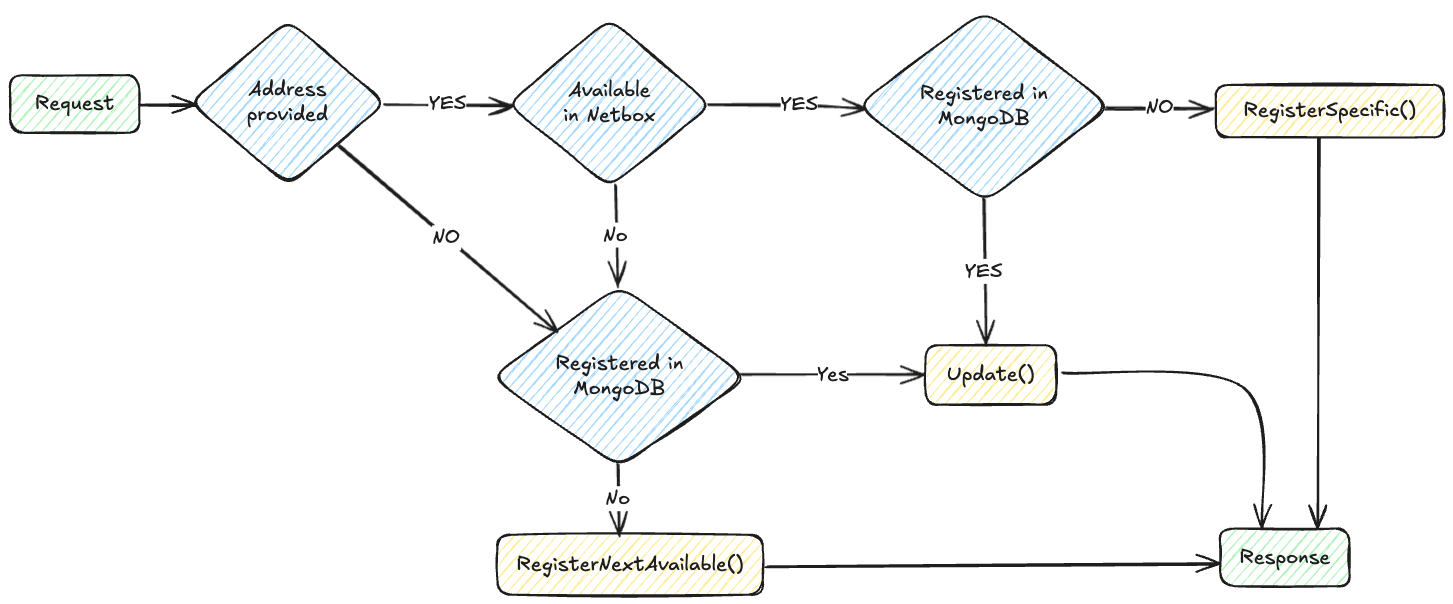
POST request
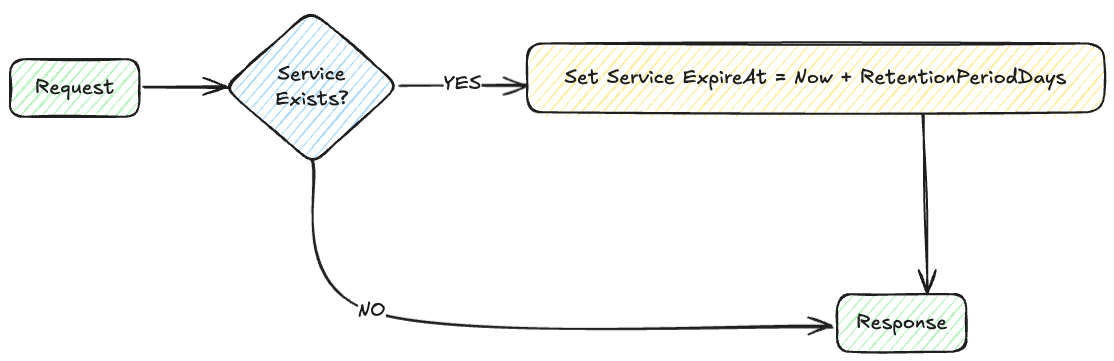
DELETE request
IPAM-CLI
The ipam-cli can be used to display or manipulate ip addresses and services stored in MongoDB, and to create a Mongodb dump for backup
Requirements
config.jsonmust be available and correctly configured (see main IPAM-API docs)ipam-cliassumes access to the same MongoDB as the IPAM-API
Build
go build -o bin/ipam-cli ./cmd/cli
ipam-api help
Command-line interface for interacting with the Vitistack IPAM-API.

Usage:
  ipam-cli [flags]
  ipam-cli [command]

Available Commands:
  completion     Generate the autocompletion script for the specified shell
  delete-cluster Set exiresAt == time.Now() for services linked to a cluster id
  delete-service Delete service from address
  help           Help about any command
  mongo-backup   Backup MongoDB data
  replace-secret Replace address secret
  show-secret    Show address secret
  show-services  Show address services
  version        Print the version

Flags:
  -h, --help   help for ipam-cli

Use "ipam-cli [command] --help" for more information about a command.
Examples
Show all services for an address
ipam-cli show-services --zone inet --address 83.118.168.10/32
Delete cluster
ipam-cli delete-cluster --cluster-id 0f3c7805-6b1d-4387-b8c4-b8c5d0e9b878
MongoDump for backup
ipam-cli mongo-backup --out ipam-backup.gz
Logging
Files
Local filesystem
ipam-api logs can be found in ./logs
- ipam-api.log - Application logs
- http.log - HTTP logs
Splunk
Configuration
When splunk is present in config.json logs from the ipam-api app and http server will be forwarded to a Splunk HEC.
{
  "splunk": {
    "enable": true,
    "url": "https://splunk-hec.example.com",
    "token_path": "splunk.secret",
    "index": "vitistack",
    "source": "vitistack:ipam-api",
    "sourcetype_app": "ipam-api:app",
    "sourcetype_http": "ipam-api:http"
  }
}
| Key | Type | Description |
|---|---|---|
enable |
boolean |
Whether Splunk integration is enabled (true) or disabled (false). |
url |
string |
URL of the Splunk HEC endpoint, in the form https://splunk-hec.example.com. |
token_path |
string |
Path to the file or secret containing the Splunk HEC token. |
index |
string |
The Splunk index where logs will be stored. |
source |
string |
The name of the source, e.g., vitistack:ipam-api. |
sourcetype_app |
string |
The Splunk sourcetype used for application logs. |
sourcetype_http |
string |
The Splunk sourcetype used for HTTP request logs. |
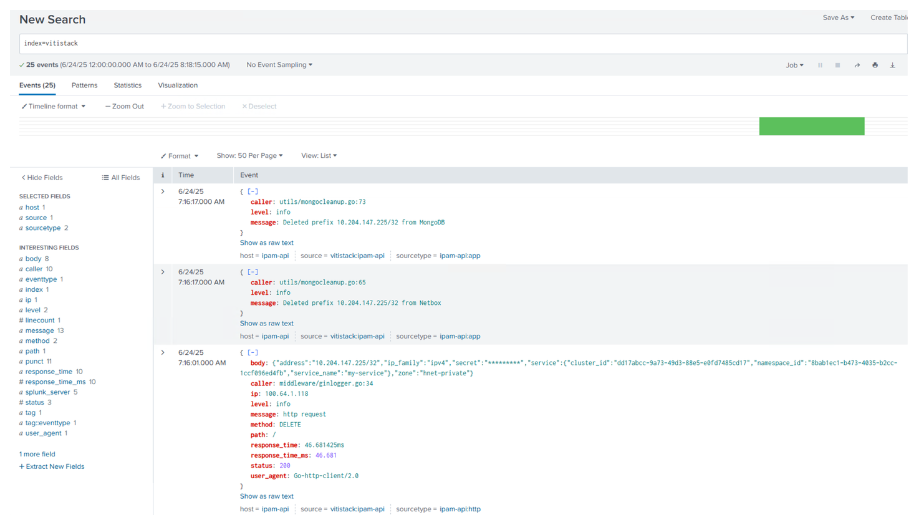
Splunk overview